Freelance discovery call: record the brief before you quote
Record a freelance discovery call in Chrome, then say the scope, deadline and budget back so the transcript holds the brief when you write the quote.
To record a freelance discovery call, ask the client first, open the Google Meet call in a Chrome tab, and take its sound in Cheap Recorder with Pick the call tab... and Share tab audio. Then say each part of the brief back in your own voice (scope, deadline, budget): the transcript is made from your microphone, so what you say back is what you can search when you write the quote.
This post does not teach pricing or contracts. It covers the recording, the read-back, and one 30-minute call worked through to a quote. The Free plan covers every step.
What a discovery call has to leave behind
A discovery call is the first call with a possible client, before any price is agreed. You write the quote afterwards, sometimes days later, from whatever you kept. A quote needs five things from that call:
- Scope. What you will make, and what you will not.
- Deadline. The date it must be done, and what that date is tied to.
- Budget. The range the client named, if they named one.
- Who decides. The person who says yes to the quote.
- Next step. What you send, and by when.
Typed notes can hold all five, but you type them while the client is still talking. A recording moves the writing to after the call. The catch is that 30 minutes of video has no index.
Ask before you record a freelance discovery call
Ask twice. First in writing, when you book the call: "I record discovery calls so my quote matches what we said. The file stays on my computer. Is that all right?" Then again out loud once the recording runs, so the answer is in the file.
The law on recording calls differs from place to place, and some places need everyone to agree, so follow the rules where you and the client are. If the client says no, do not record. Take notes and still say the brief back: the client hears their own brief and can correct it on the spot.
Set up the call in Chrome
Open the call, or its waiting screen, in a Chrome tab. It has to be in Chrome, because Chrome only hands a web page the sound of another tab when you share that tab and tick its tab-audio option. Then open Cheap Recorder in another tab and sign in. The Google Meet guide has these steps in more detail.
- Under Where to save, press Choose folder... and pick a folder for client calls. Each recording gets its own folder inside it.
- Check that the Microphone tile names the microphone you mean to use.
- In the Call audio tile, press Pick the call tab..., choose the Meet tab, tick Share tab audio, then press Share. The tile should say "on" followed by the tab's name.
- Under What to capture, choose A browser tab and pick the Meet tab if you want the client's shared screen in the picture. Leave tab audio unticked in that sharing window, or the client's voice goes into the file twice.
- Type a name in Name this recording, such as "Discovery 07 bakery site".
The privacy page says the recorder's activity log holds the folder and file names you chose. If the client's name is confidential, use a project code.
Wear headphones, so the client's voice does not come out of your speakers and back into your microphone. Leave Record the microphone untouched under Options unticked, because it turns off the echo, noise and volume correction. Record a 30-second test before the client joins and play it back. If a recording comes out silent, the no sound guide lists the causes.
Say the brief back: the transcript hears your microphone
The MP4 holds both voices. The transcript does not have to. The transcript guide says the transcript is made from what Chrome hears on your microphone. The recorder's own code, read on 15 November 2026, starts Chrome's speech recognition without handing it the call tab's sound. The call's sound goes into the recording, not into the text.
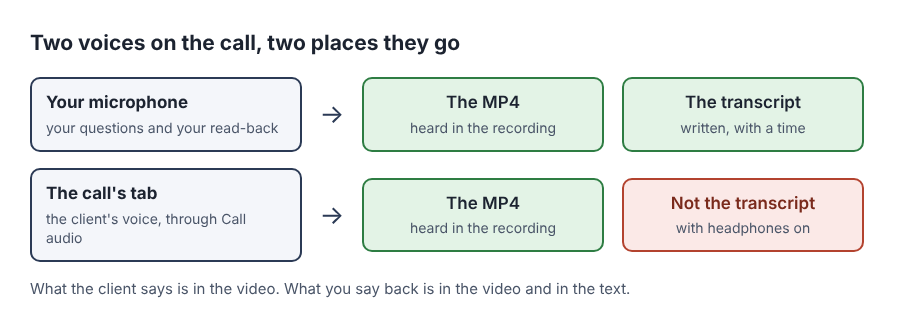
With headphones on, your microphone does not hear the client. Their budget, their deadline and their "yes" are in the video. The mistake to avoid: you open the transcript to copy the brief and find only your own questions.
The fix is a habit, not a setting. After each of the five answers, say it back, and start with the same two words every time:
Client: "We could go up to three thousand." You: "To confirm, the budget is up to three thousand dollars, all in."
That sentence does three jobs. It puts the number in the transcript with a time. It lets the client correct you while you are both still on the call. And "to confirm" is something you can search for later, which a number is not: no guide says whether Chrome writes "three thousand" as words or as digits.
A worked example: a 30-minute call, five lines for the quote
Say a bakery owner wants a new website. The call runs 30 minutes. You say back five things, each starting with "to confirm".
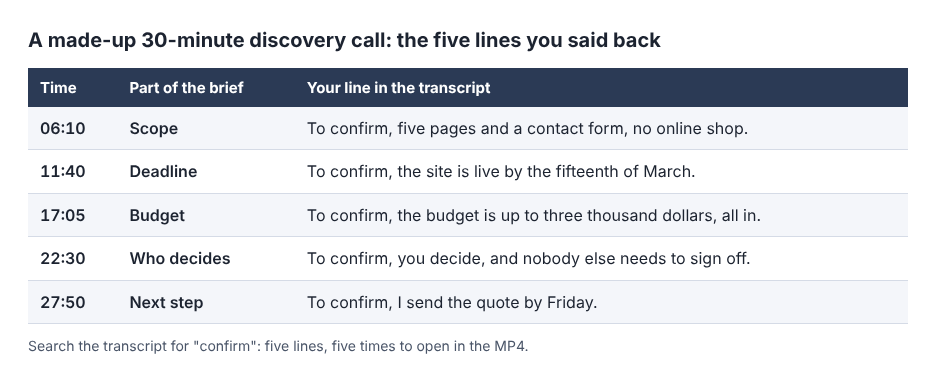
Afterwards your folder holds Discovery 07 bakery site.mp4 and Discovery 07 bakery site - transcript.txt, plain text with a time on each line. Open the transcript in a text editor and search for "confirm". Five hits, five times.
Copy the five lines into the quote as its skeleton: five pages and a contact form, no online shop; live by 15 March; up to 3,000 dollars; the owner decides; quote by Friday. Then open the MP4 at each time, start half a minute earlier, and listen for one minute. That is where the client said the thing you repeated, and where they agreed or corrected you. Five minutes of listening in place of 30.
The listening can change the quote. Say that at 11:40 the client answered your deadline line with "the fifteenth is opening day, so really the week before", and you said "got it" and moved on. The transcript has your line and not theirs. After the replay, the quote says 8 March. Written from the transcript alone, it would have promised a date one week too late.
The transcript's times are close, not exact, because Chrome reports a time for each line and not for each word. The Free plan card shows 12 hours of recording time. Six 30-minute discovery calls a month are 3 hours, and six 30-second tests add 3 minutes.
The recording is your notes, not the agreement
Why write the brief down at all, if you have it on video? Because in some places the written version is a legal right. New York City's Department of Consumer and Worker Protection says on its Freelance Isn't Free Act page that Local Law 140 of 2016 took effect on 15 May 2017 and gives freelance workers the right to a written contract, timely and full payment, and protection from retaliation. New York State's Department of Labor says the state's own act added Article 44-A to the General Business Law on 28 August 2024, with contract requirements, and that the department has a model contract to meet them.
Those pages cover one city and one state. The point that travels is narrower: what you and the client both hold is the written quote or contract, not the call. Put the five lines near the top of the quote and ask the client to reply "agreed" or to correct them. A client's "sounds good" at minute 17 is a reason to write a line. It is not the line.
Limits, and what is still unsettled
The strongest objection: a first call is the worst time to ask. A client who has just met you may not want a file of the call to exist, and that is theirs to decide. Typed notes and the read-back do most of the job without one.
The transcript writes words, not figures. No guide says how Chrome's speech recognition writes a spoken amount or date. Check each number against the MP4 before it goes into a quote.
Whether a recording helps in a dispute is not settled here. It depends on where you are and how the recording was made. Ask a lawyer where you work.
Your read-back goes to Google as audio. While the live transcript is on, Chrome sends the microphone audio to Google to turn it into text. If the project is confidential, untick Live transcript before you press Start recording and write the five times on paper.
A stopped tab share cannot be added back. If "Meeting audio sharing stopped." appears, the client is silent in the file from then on. Stop and start a new recording.
Once the quote is accepted, the client check-in call post covers action items, and the follow-up video post covers what to send after a call.
Frequently asked questions
Can I record a freelance discovery call on the Free plan?
Yes. The Free plan needs no card, shows 12 hours of recording time, and covers every step in the Google Meet guide, with the live transcript included.
Why is the client's budget missing from the transcript?
The transcript is made from what Chrome hears on your microphone, and with headphones on your microphone does not hear the client. Their voice is still in the MP4. Say the budget back so it lands in the text.
Do I have to tell the client I am recording?
Tell the client before you start. The law on recording calls differs from place to place, and some places need everyone to agree.
Is the recording the agreement?
Treat it as your notes. Put the scope, deadline and price in a written quote or contract, and ask the client to agree to that in writing.
Get started
Ask the client, record a 30-second test, and say the first answer back. Start free with Cheap Recorder, no card needed.
Screen recording that is cheap and easy.
Visit cheaprecorder.com↗