Sign language practice: record yourself on webcam to review
Sign language practice on webcam: frame your face and both hands, test for a flipped picture, record short takes and review them beside a model.
Sign language practice on your own works best with a recording: set a webcam so your face, both hands and upper body are in the frame, sign one short phrase, then watch it beside your teacher's model. Cheap Recorder does this in Google Chrome with Webcam only, and saves each take as an MP4 in a folder on your own computer.
This post does not teach a sign language and cannot judge your signing. It covers the recording: what must be in the picture, what a recording shows that a mirror does not, what to test first, and what to do about a transcript that has nothing to hear.
What sign language practice on video has to show
The hands are only part of it. The US National Institute on Deafness and Other Communication Disorders (NIDCD) describes American Sign Language (ASL) on its own page as "expressed by movements of the hands and face". It gives an example. English speakers ask a question by raising the pitch of their voice. ASL users ask one "by raising their eyebrows, widening their eyes, and tilting their bodies forward".
So a frame that holds only your hands loses part of the sentence. It is an easy mistake to make, because craft videos are filmed the other way: a knitting tutorial points the camera down at the work and leaves the face out. For signing, the picture needs three things at once:
- Your face, clear enough to see your eyebrows and eyes.
- Both hands, for the whole movement, including its highest and widest point.
- Your upper body, so a lean forward shows.
What a recording shows that a mirror cannot
A mirror flips you. Raise your right hand and it appears on the right side of the glass. A person facing you sees that hand on their left. A model video filmed from the front shows the second view, so a mirror and the model do not line up.
A recording can show the second view. The recorder's code, read on the live page for this post, has no line that flips the camera picture, and the guide says "The preview is the recording". That was read, not tried on every camera, and a camera can flip its own picture before Chrome gets it. The test below settles it for yours.
The other difference is replay. In a mirror the movement is gone when it ends. A file can be paused, played again and set next to the model.
Set up Webcam only for your signing space
- Open the recorder in Chrome, sign in, and under Where to save press Choose folder. Make a folder just for practice.
- Under What to capture, choose Webcam only. It records only your camera and microphone. No screen is shared, and the Layout menu is hidden because there is only one picture. The screen and webcam guide has the full steps.
- Move back until the Preview shows you from above your head to your waist, with empty space on both sides.
- Leave Background on None. Blur uses a person finder, and no guide says how it treats hands that move fast. Do not put it between you and your review.
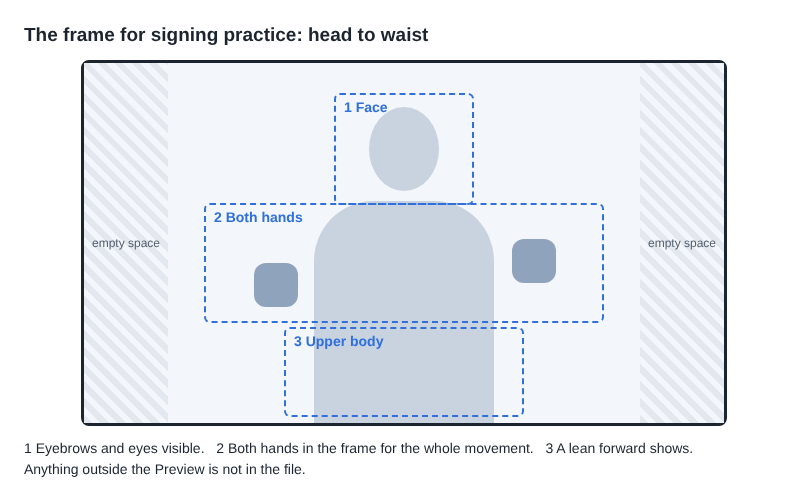
Trust the Preview, not your camera's own app. The camera is never stretched: if its shape does not match its box, it is trimmed evenly from both sides. Anything outside the Preview is not in the file.
Three checks in a 30-second test
The course guide says to record a 30-second test at the start of each session and play it back. For signing, the test answers three questions.
- Is the picture flipped? Raise your right hand. On playback, it should be on the left side of the picture, the way a person facing you sees it. If it is on the right, your camera flips its picture. Remember that when you compare with the model.
- Do the edges cut anything? Make your highest and your widest movement. Both hands must stay in the frame all the way.
- Is a fast hand sharp? Sign something quick, then pause the playback in the middle of it.
The third check has a number behind it. The recorder asks your camera for a picture 1280 wide and 720 high, 30 times a second. That is one picture every 33 thousandths of a second. A handshape you hold for a tenth of a second lands in only three pictures. What your camera really delivers is not on any guide page, so look. If a paused hand is a smear, that camera in that room cannot show the detail at that speed. Sign slower for the recording, or try a brighter room, and test again.
Signing makes no sound, so the transcript stays empty
Live transcript is ticked when the recorder opens. Its own note says: "Writes your words as you speak. Chrome sends the microphone audio to Google while this is on." The transcript guide says it is made from what Chrome hears on your microphone. Signing gives it nothing to hear, and the transcript file is saved only when it heard some speech. A silent take has no transcript.
So untick Live transcript under Options before you start. Your microphone audio is then not sent to Google. The microphone still records the sound of the room into the MP4, which does no harm.
Without a transcript to search, the names do the work. Keep each take to one phrase and type a numbered name such as "Signs 04 question" into Name this recording. Each take gets its own folder, named with the date and that name, as the guide to where recordings are saved shows. If you also speak, you can leave the transcript on and say the phrase's name before you sign it, the way pronunciation practice uses it. You get one timed line per take.
The recordings stay in your folder. They are not uploaded unless you use Convert or Download MP3. The recorder's activity log does hold the folder and file names you choose, so name takes by number and topic, not by anything private.
A worked example: five takes in under four minutes
Maya is a made-up learner in an evening ASL class. Her teacher sent a model video of this week's five items. Each evening she records the test, then five takes of 40 seconds, signing each item three times.
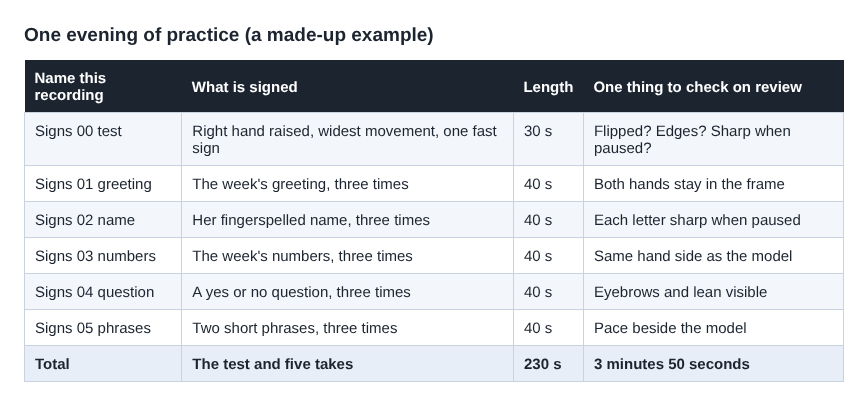
That is 30 seconds plus five times 40 seconds: 230 seconds, or 3 minutes 50 seconds. She plays each take beside the model and writes down one difference per take.
Two takes change what she does next. In take 4, a yes or no question, her eyebrows stay flat in two of the three repeats. She only sees it because her face is in the frame. In take 2, her fingerspelled name, one letter is a smear when paused, so she cannot tell which handshape she made. She records both again, slower: 80 more seconds, not the whole session. She sends the new take 2 to her teacher, because the recording cannot say whether the letter is right.
Twenty evenings a month come to 4,600 seconds, about 77 minutes. The Free plan's card shows 12 hours of recording time, so this routine uses about a tenth of it.
What a recording cannot tell you
A recording shows what you did. It does not show whether it was right. That is the real limit of practising alone, and three facts from the NIDCD page make it sharper.
First, "there is no universal sign language". British Sign Language is a different language from ASL, so the model must be in the language you are learning. Second, ASL has "regional accents and dialects", with differences in rhythm and in the signs used. A difference between you and the model may be a variant, not a mistake, and only a fluent signer can say which. Third, "no person or committee invented ASL". It grew over more than 200 years out of local sign languages and French Sign Language. There is no rule book a camera could check you against. The people who use the language are the standard.
Two things are still open. Whether watching yourself speeds up learning is not answered here: this post opened no study that measures it, and the NIDCD lists how sign language is acquired among the research it still funds. And the flip check and the Blur warning come from reading code and guides, not from trying many cameras. Your own test take is the evidence.
Frequently asked questions
Does Cheap Recorder mirror my webcam recording?
The recorder's code has no line that flips the camera picture, so expect the view of a person facing you. Some cameras flip their own picture, so raise your right hand in a test take and look.
Will the live transcript write down what I sign?
No. It is made from what Chrome hears on your microphone, and signing makes no sound. Untick Live transcript for silent takes.
Can I watch a take in slow motion?
Each take is an ordinary MP4 in your folder. Open it in a video player that can slow down or step through pictures. At 30 pictures a second, a fast handshape may be in only two or three of them.
Is my practice video uploaded anywhere?
No. It is saved in the folder you chose. Only Convert or Download MP3 sends a file to Cheap Recorder's server, and it is deleted there when the conversion finishes.
Get started
The Free plan needs no card and gives you 12 hours of recording time a month on one device, with your files on your own disk. Choose Webcam only, record a 30-second test with your right hand raised, and do your first sign language practice take tonight. Start recording for free.
Screen recording that is cheap and easy.
Visit cheaprecorder.com↗