Pronunciation practice: record yourself and read the transcript
For pronunciation practice alone, record a short script in Chrome and compare the transcript with it. A changed word marks where to listen again.
For pronunciation practice on your own, record yourself reading a short script in Chrome with Cheap Recorder's live transcript on, then set the transcript beside the script. Each word that came out different marks a place to listen to again. The transcript does not score how you sound: it only shows what Chrome's speech recognition took your words for.
This post does not teach a language. It covers how a spoken word becomes a line of text, how to set up a take, a script that tests one sound at a time, and how far to trust the result. The Free plan covers every step.
What a transcript can and cannot tell you
You read "sheep" and the transcript says "ship". That is a mismatch, and it is useful. It gives you a word and a time, so you can go to that moment in the recording and hear what you said.
You read "sheep" and the transcript says "sheep". That is a match, and it proves less than it seems. It means a machine set to one language took your sound for that word. It does not mean the sound was the one a listener expects.
So the transcript does one job: it tells you where to point your ears. The listening is still yours.
How a spoken word becomes one line of text
The transcript guide and the recorder's own code, read on 14 November 2026, give the path step by step.
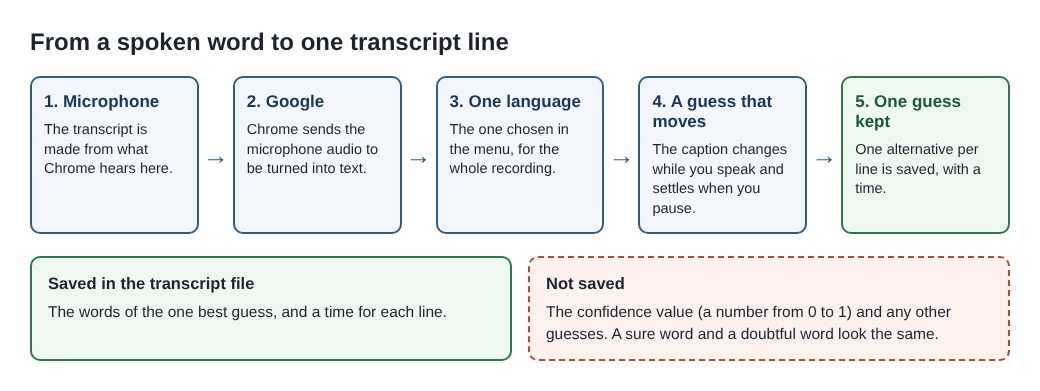
- Your microphone. The transcript is made from what Chrome hears on your microphone.
- Google. While the transcript is on, Chrome sends the microphone audio to Google to turn it into text. You need to be online.
- One language. The recorder hands Chrome the language chosen in the menu beside Live transcript. Chrome listens for that one language for the whole recording.
- A guess that moves. Your words appear as captions while you speak and settle into a finished line when you pause. The Web Speech API specification, the document that defines this browser feature, calls the unsettled text "the current best hypothesis".
- One guess kept. The code asks Chrome for one alternative per line and saves its words with a time.
Step 5 holds the detail that matters for practice. The specification (the community group draft dated 27 October 2026) gives every alternative a confidence value, a number between 0 and 1 for how sure the recogniser is. The recorder does not save that number. In the text file, a word Chrome was sure of and a word it barely made out look the same.
Set up a pronunciation practice recording
Open Cheap Recorder in Chrome and sign in.
- Under Where to save, press Choose folder... and pick a folder for your practice. Each recording gets its own folder inside it.
- For sound only, switch off Record my webcam and do not pick a screen. The recording is then an M4A audio file. To watch your mouth as well, choose Webcam only, which records your camera and microphone and shares no screen. The screen and webcam guide covers that choice.
- Open Options and check that Live transcript is ticked.
- In the menu beside it, choose the language you are practising, not the one you grew up with. There are 25, including English (UK), English (US), French, German, Spanish and Japanese. Check it before every recording: the menu goes back to its default each time the recorder page opens.
- Type a dated name in Name this recording, such as "Vowels 14 Nov take 1".
Put the microphone close to your mouth. The guide says a headset or a desk microphone beats a laptop's built-in one in a noisy room. Here that matters twice: room noise can change a word in the transcript, and you will blame your tongue for it. Record a 30-second test, play it back, and open the transcript before the real take.
Write a script that tests one sound at a time
A good script is short and built around the sounds you struggle with. Pick pairs of words that differ in a single sound, such as sheep and ship, or think and sink. Language teachers call these minimal pairs.
Then read every target word twice, in two ways:
- Inside a sentence. "The sheep waited by the ship." This is how you will use the word in real speech.
- Alone, in a list. Say one word, pause for two seconds, say the next. Each word should settle into its own line with its own time. Check that in your test.
The two readings differ in what the recogniser has to go on. In a sentence, its guess stays open until you pause, so the words around a sound can still shape it. A lone word gives it only your sound. No guide says how much the other words help, so read both ways and compare.
A worked example: six words, read two ways
Say you are learning English and three pairs give you trouble: sheep and ship, think and sink, right and light. Your script has three sentences that use all six words, then the six words as a list. One take lasts about a minute.
Afterwards the folder holds Vowels 14 Nov take 1.m4a and Vowels 14 Nov take 1 - transcript.txt, plain text with a time on each line. Open the text file beside your script.
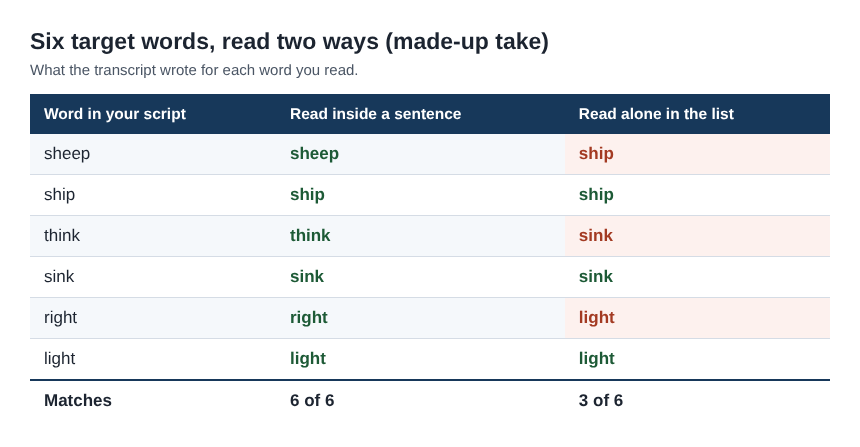
In this made-up take, all six words match inside the sentences. In the list, three do not: "sheep" came out as "ship", "think" as "sink" and "right" as "light". Had you read only the sentences, you would have counted six out of six and stopped.
Now use the times. Find the list line for "sheep" in the transcript, read its time, and play the M4A from a few seconds before it. The times are close, not exact, because Chrome reports a time for each line and not for each word. Listen to your "sheep", then to your "ship" on the next line. If you cannot hear a difference, that is the sound to work on. If you can, record the list again before you trust one mismatch.
Keep the count by day: 3 of 6 on day one, perhaps 5 of 6 a week later. The count going up means the machine's guess changed. Treat it as a reason to listen, not as a grade.
The cost in plan time is small. Two one-minute takes a day for 30 days are 60 minutes. A 30-second test each day adds 15. That is 75 minutes of the 12 hours on the Free plan card.
Limits, and what is still unsettled
The strongest objection: the tool was built to take down words, not to judge them. The specification describes speech recognition as an input for forms, dictation and control. Its job is to get your words into text. So a match can hide a sound that is off, and this method gives you no way to count how often that happens.
The transcript holds words only. It says nothing about stress, rhythm or the rise and fall of a sentence. For those, the recording is all you have.
Recognisers do not hear every voice equally well. A 2020 study in the Proceedings of the National Academy of Sciences, led by Allison Koenecke, gave interviews with 42 white and 73 Black American speakers to five commercial speech recognition systems, Google's among them. The average word error rate was 0.19 for the white speakers and 0.35 for the Black speakers. The gap was as large on identical phrases spoken by both groups, so the authors traced it to how the systems model sound, not to word choice. The study did not test Chrome as it is today. It does show that a changed word can come from what a recogniser was built on, not from a mistake of yours.
Which accent the menu expects is not written down. The menu lists English (UK) and English (US) as separate choices. No guide says how differently Chrome hears one speaker under each. To find out for your own voice, read one script under each setting, in two recordings.
Even the missing number would not be a grade. The specification notes that its authors discussed whether the confidence value can be defined the same way for every speech engine. That question is still open in the draft.
Your voice goes to Google while the transcript is on. If a practice take must not leave your computer in any form, untick Live transcript and listen back without the text. A transcript cannot be added to that recording afterwards.
A teacher can tell you what to change in your mouth. A transcript cannot. For lessons on a call, see the language lesson post; for a longer text read on camera, the speech practice post. The where recordings are saved guide lists every file in the folder.
Frequently asked questions
Can the transcript grade my pronunciation?
No. It shows the words Chrome's speech recognition took your speech for, with a time on each line. A changed word tells you where to listen. It does not measure how well you said it.
Which language should I choose in the menu?
The language you are practising. Chrome listens for one language per recording, and the menu goes back to its default each time the recorder page opens, so check it before every take.
Is pronunciation practice possible on the Free plan?
Yes. The live transcript is part of the Free plan, which needs no card and shows 12 hours of recording time.
Why did a word I said clearly come out wrong?
The transcript keeps one guess per line and no sign of how sure it was. Room noise, a far microphone or the wrong language setting can change a word, so check those and record the word again.
Get started
Write six words, read them two ways, and listen where the transcript differs. Start free with Cheap Recorder, no card needed.
Screen recording that is cheap and easy.
Visit cheaprecorder.com↗