Poetry reading at home: record it as an audio file
Record a poetry reading at home in Chrome as a sound-only M4A file, one poem per named take, then use the transcript's line times to pick your better take.
A poetry reading at home needs three things: a quiet room, a microphone close to your mouth, and Google Chrome. This guide shows you how to record each poem as its own audio file, check which take you read best, and download the one you want to keep. It is for poets who want to hear their work out loud, send a reading to a friend, or keep a record of how a poem sounded the night it was finished.
You record sound only, so there is no camera, no lighting and nothing behind you to tidy. The file lands in a folder on your own computer.
What a poetry reading at home needs
Cheap Recorder runs in Google Chrome and saves every recording to a folder you pick on your computer. When you switch off Record my webcam and do not pick a screen, it saves an M4A audio file instead of a video.
- A quiet room with soft things in it. Curtains, a rug, a sofa or a full bookshelf soak up echo. A bedroom often sounds better than a kitchen.
- A wired or USB microphone. A laptop's own microphone works, but a microphone a hand's width from your mouth hears you, not the room.
- Your poems on paper or a screen. Lay the pages out flat before you start, because a turning page is loud on a quiet recording.
- An account. The Free plan needs no card and gives you 12 hours of recording a month on 1 device at once.
Skip a Bluetooth headset as your microphone. The recorder shows Bluetooth microphone selected as a warning, and on a Mac a Bluetooth headset used as a microphone switches to a low-quality mode that sounds like an old phone line. That is the opposite of what a poem needs.
If you have read our posts on a guided meditation in your own voice or a sample audiobook chapter, the setup will feel familiar. What is different here is the unit of work: one poem, one file.
Set up the room and the microphone
Before you open the recorder, turn off fans and heaters, close the window, and silence your phone. Sit at the same distance from the microphone for every poem, so the takes sound alike when someone plays them one after another.
Then open the recorder in Chrome:
- Switch off Record my webcam and leave the screen unpicked.
- Tick the microphone you will read into.
- Press Choose folder... and pick a folder, such as
Poems. The recorder does not remember the folder between visits, so you choose it again each time you come back. - Under Options, decide on Record the microphone untouched. It turns off the echo, noise and volume correction. Tick it if you have a good microphone in a quiet room, because a poem that moves from a whisper to a full voice is better left as you read it. Leave it unticked on a laptop microphone or in a noisy room.
- Leave Live transcript ticked and choose the language you will read in. There are 25. You will use the transcript to compare takes later.
Test for 30 seconds before the first poem
It is much quicker to find a sound problem in a thirty-second test than at the end of a long evening. Name the test Test, press Start recording, and read your loudest stanza and your quietest one. Watch the level bar for your microphone while you read: it should move with your voice. If it stays still, the wrong microphone is ticked or the microphone's own mute is on.
Stop and play the test back. Listen for hum, echo, and the quiet stanza falling away to nothing. Fix what you hear, move closer if the quiet lines are thin, and test again. The no sound guide explains each microphone message if something is wrong.
Record one poem per named take
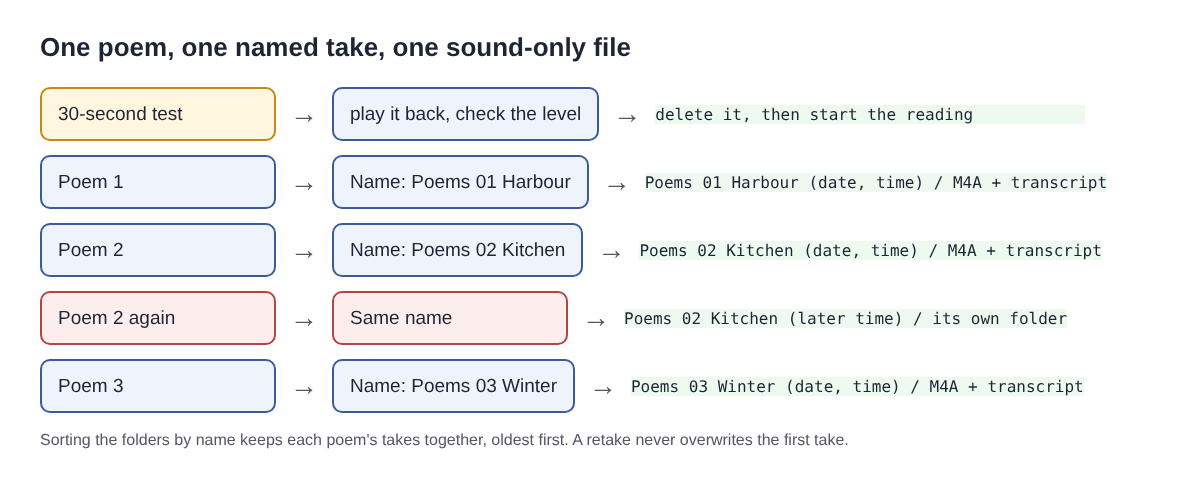
Type a name in Name this recording before each poem. If you leave it empty, the recording is simply called Recording, and ten of those are hard to tell apart. Put a number first so the poems stay in reading order: Poems 01 Harbour, Poems 02 Kitchen, Poems 03 Winter.
Each recording gets its own folder, named with what you typed and the date and time it began. Read a poem again under the same name and the new take gets a new folder; it never mixes with the first. Sorting the folders by name keeps each poem's takes together, oldest first. Characters a file name cannot hold, such as a question mark or a colon, are left out, and names are cut at 60 characters, so keep titles short.
Start each take by saying the poem's title and your name out loud, then wait a breath and read. That spoken first line does two jobs: a listener knows what they are hearing, and the transcript's first line tells you which poem the file holds. Pauses inside the poem are fine. If Chrome's speech recognition stops listening during a silence, the recorder starts it again while you are still recording.
Worked example: a five-poem set in one evening
Say you want to send a friend five poems you finished this year. Each one takes about two minutes to read.
- Record a 30-second test, play it back, and adjust.
- Record
Poems 01 Harbour. It goes well; move on. - Record
Poems 02 Kitchen. You rush the middle, so you read it again under the same name. - Record poems 03, 04 and 05. Poem 04 gets a second take when a car passes outside.
That is seven takes of about two minutes each, plus the test: under 20 minutes of recording. On the Free plan's 12 hours a month you could do this every evening for a month and stay inside it. Your Poems folder now holds the test plus seven recording folders, each with an M4A and a transcript text file. Delete the test when you are happy with the sound.
If friends read with you, tell each of them you are recording before you start.
Pick the better take with the transcript
With the live transcript on, each recording's folder holds a plain-text transcript with the time of each line. For a poem, that is a pacing tool. Open both transcripts for Poems 02 Kitchen side by side, find the first words of each stanza, and note the time each began.
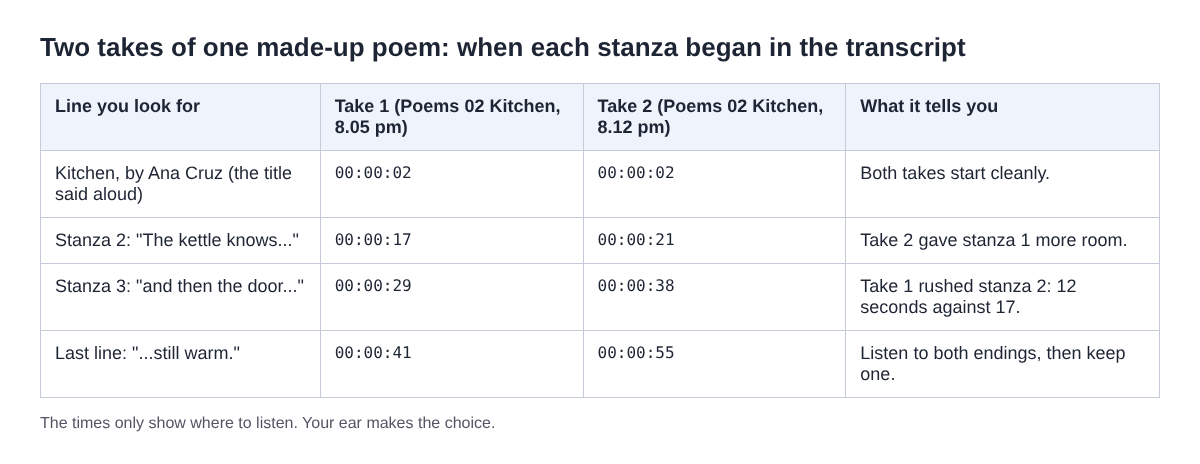
In the example, stanza 2 took 12 seconds in the first take and 17 in the second. If you meant that stanza to slow down, the second take did what you wanted. The times only point you to where to listen; play both endings and let your ear decide.
Do not expect the transcript to match your lines. Speech recognition writes what it hears, in lines of its own, and it can mishear a word you read clearly. It is a map of the reading, not a copy of the poem. Once you have chosen, delete the takes you will not keep, so the folder holds only the reading you are proud of.
Download the reading as M4A, MP3 or WAV
The card for each recording has a download button that follows the recording's own format, so for a sound-only take it reads Download M4A. It hands you the original straight from your computer, with no upload. M4A is AAC sound, which plays on most phones and computers.
If someone asks for another format, Download MP3 and Convert send the file to the Cheap Recorder server, which deletes it as soon as the conversion finishes. The original in your folder is never changed. WAV is sound only, 16-bit at 48 kHz with no compression: the biggest file, and the best starting point if you want to tidy the reading in an audio editor. The convert guide lists every format.
A note for unpublished work. Your recordings stay on your computer, but while the live transcript is on, Chrome sends your microphone audio to Google to turn it into text. If a poem must not leave your computer yet, untick Live transcript before you start, and compare takes by ear instead. The guide to where recordings are saved shows exactly what lands in each folder.
Frequently asked questions
Should I record the whole reading in one take?
One poem per take is easier. A slip means reading one poem again, not the whole set, and the numbered names keep the files in order.
Can I use my laptop's microphone?
Yes. Leave Record the microphone untouched unticked so the echo and noise correction stays on, and read in your quietest room.
Will the transcript show my line breaks?
No. Speech recognition breaks lines where it hears them, not where your poem does. Use its times to compare takes, not as a copy of the poem.
Which format should I send to a friend?
The M4A you already have plays on most phones and computers. Convert to MP3 if they ask for it, or to WAV if they want to edit the sound.
Get started
Pick one poem, find your quietest room, and record a 30-second test tonight. Create a free account, no card needed, and your first reading saves to a folder on your own computer.
Screen recording that is cheap and easy.
Visit cheaprecorder.com↗