Guided meditation: record one in your own voice as audio
Record a guided meditation in Chrome as a sound-only M4A file in your own folder, check your pauses with the transcript's times, and share it as an MP3.
A guided meditation works best in a voice your listeners already know, and that is usually yours. This post shows you how to record a guided meditation as a sound-only file in Google Chrome with Cheap Recorder: a script with the pauses written in, a quiet room, one take after a short test, and a transcript whose times tell you whether your pauses were long enough. You end with an M4A file in your own folder and an MP3 you can send.
Why record a guided meditation as sound only
Your listeners will have their eyes closed. A picture adds nothing, and a video file is larger and harder to play on a phone at bedtime. A sound file is small, plays in any audio app, and can be sent by email or added to a class page.
Cheap Recorder makes a sound-only recording when you switch off Record my webcam and do not pick a screen. It then saves an M4A audio file instead of an MP4, in a folder you choose on your own computer. It runs in Chrome on a Mac, Windows or Linux computer, and the Free plan gives you 12 hours of recording time a month, the live transcript and files on your disk, with no card needed.
This is a different job from a church sermon recorded from the room or a quick voice note with a transcript. A meditation is mostly silence. The hard part is the pauses, not the words.
Write the script with the pauses in it
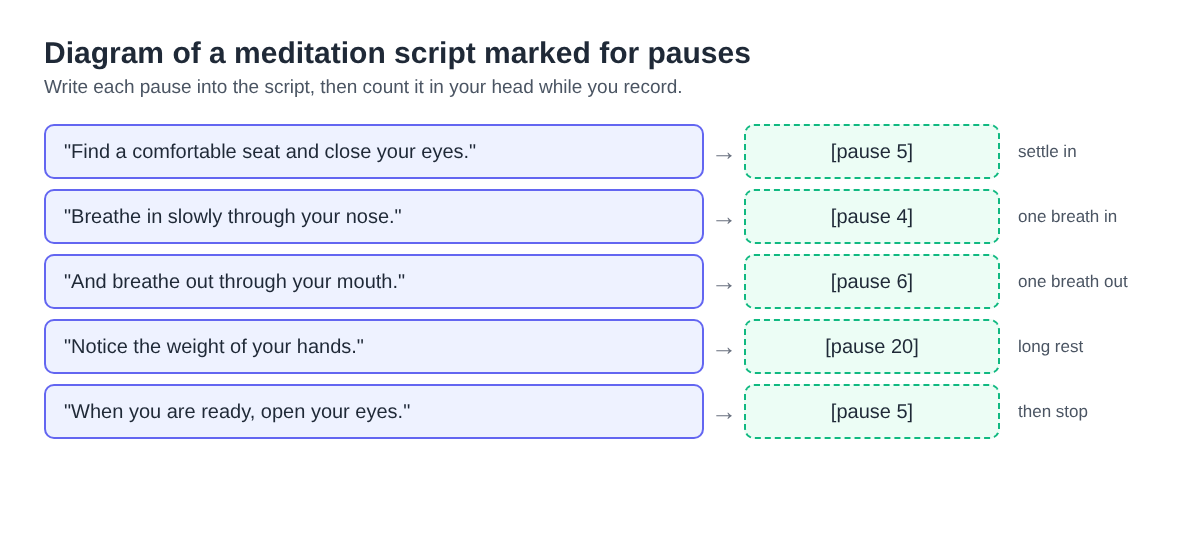
When you read a meditation aloud, every pause feels longer than it is. Most people rush. The fix is to write each pause into the script as a number of seconds, and count it in your head while you record.
- One instruction per line. "Breathe in slowly through your nose." Then a pause.
- Write the pause in brackets after the line: [pause 4], [pause 20].
- Keep the long rests for the middle. The opening needs short pauses so the listener settles in.
- Read the whole script once with a timer before you record. If a ten-minute plan comes out at seven, your pauses are too short.
Print the script or put it on a second device. Paper is silent; a laptop that chimes with a new message in the middle of a body scan is not.
Set up a quiet room and a microphone for a soft voice
A meditation voice is quiet and slow, so the room matters more than usual. Pick the quietest room you have, close the window, and switch off anything that hums. Soft things in the room, like a sofa, curtains or a rug, cut the hollow sound of bare walls.
Use a wired or USB microphone close to your mouth. If the recorder shows Bluetooth microphone selected, take it as the warning it is and switch to a wired one. In the Microphone tile, open Change or add microphones and tick the one you speak into. If it is missing, plug it in and press Rescan.
Then decide about Record the microphone untouched, under Options. By default Chrome cleans up echo and noise and corrects the volume. That volume correction can make a very quiet voice pump up and down, which is exactly what a soft meditation voice sounds like.
- A good microphone in a quiet room: tick Record the microphone untouched and you get the plain signal.
- A laptop microphone or a room with noise you cannot stop: leave it unticked and let the clean-up help.
Record a guided meditation in one take
- Open Cheap Recorder in Chrome and sign in.
- Under Where to save, press Choose folder..., pick a folder such as "Meditations", and allow Chrome to edit files in it.
- Type a name in Name this recording, for example "Body scan 10 min". Left empty, it is simply called "Recording".
- Tick your microphone in the Microphone tile.
- Switch off Record my webcam and do not pick a screen. This is what makes the file an M4A.
- Open Options. Check Live transcript is ticked and the language beside it is the one you will speak. Tick or untick Record the microphone untouched as above.
- Record a 30-second test: read your first three lines with their pauses, press Stop and finish, and play it back on the card. Listen for hum, a level that is too low, and breath noise on the microphone.
- Press Start recording, wait two seconds, and read the script. Count every pause.
- After the last line, stay silent for a few seconds, then press Stop and finish.
If you stumble, do not stop. Leave a pause, go back to the start of the sentence and read it again. You can fix it later in an audio editor, or record the whole thing again; ten minutes is a short take. Before a long session, open your name in the top right to check how many minutes you have left, because the recording stops if they run out.
If you record a meditation live in a class or on a call, tell the people there that you are recording before you start. The law on recording differs from place to place, and some places need everyone to agree.
A worked example: check a ten-minute body scan with the transcript
Say you teach a Thursday evening yoga class and want to send students a ten-minute body scan to use at home. You record it as "Body scan 10 min" with the live transcript on. When you stop, the folder holds two files: the M4A, and a plain-text transcript named "Body scan 10 min - transcript.txt", with the time of each line.
Open the transcript next to your script. The time between one line and the next is the line itself plus the pause after it. Take off the two or three seconds it takes to say the line, and what is left is the pause your listeners will hear.
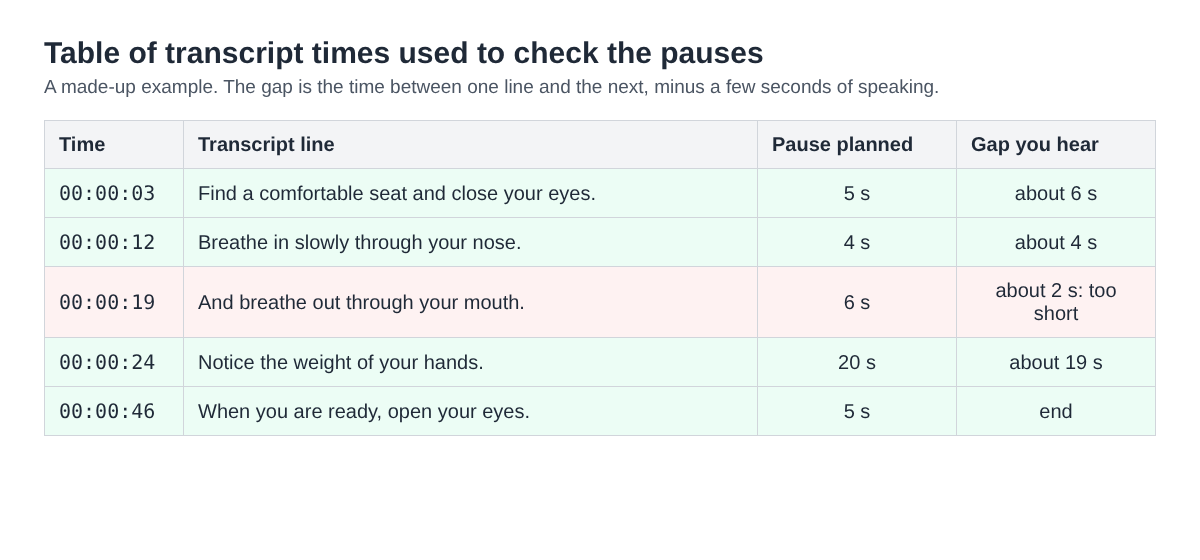
In this example, every pause is close to the plan except the breath out. A listener following along would be told to breathe in again before they finished breathing out. That is the line to re-record.
The times are close, not exact, and a long silence has no line of its own, so use the gaps as a guide. Two habits help: say each instruction in a full sentence, so the transcript catches it as one line, and if the whole script runs short, record again with each pause counted a little slower rather than adding words.
The transcript is also a clean copy of what you actually said, which is rarely word for word the script. Paste it into the description when you send the file, or keep it as next year's script.
Share it as an MP3, and what leaves your computer
On the card after Stop and finish, the first download button follows the format, so it reads Download M4A and hands over the original with no upload. Many podcast hosts and some apps want an MP3, so press Download MP3. If you want to add music under your voice in an audio editor, open More formats... and choose WAV, which is 16-bit at 48 kHz and the best starting point for editing. MP3 and M4A are made at 192 kbps. MP4, MOV, WebM and GIF need a picture, so they do not apply here.
Download MP3 and Convert send the file to the Cheap Recorder server, which deletes it as soon as the conversion finishes; the converted copy is also saved in the recording's folder. The card lasts only while the recorder page stays open. After a reload it is gone, but your files are still in the folder.
The live transcript is made by Chrome's speech recognition, and Chrome sends the microphone audio to Google to turn it into text. If a recording must not leave your computer in any form, untick Live transcript before you press Start recording. You then lose the pause check above, so time the pauses by ear instead. The where recordings are saved guide and the convert guide have the details.
Frequently asked questions
Can I record a guided meditation with no video at all?
Yes. Switch off Record my webcam and do not pick a screen, and Cheap Recorder saves an M4A audio file instead of an MP4.
Should I tick Record the microphone untouched for a meditation?
Tick it with a good microphone in a quiet room, especially if your soft voice pumps up and down. Leave it unticked on a laptop microphone or in a noisy room.
How do I check my pauses were long enough?
Open the transcript text file next to your script. The time between two lines, minus the seconds it takes to say the first one, is the pause your listeners hear.
Is the Free plan enough to record meditations?
For most people, yes. The Free plan has 12 hours of recording time a month, the live transcript and files on your disk, with no card needed.
Get started
Write your script with the pauses in it, record a 30-second test, then read it in one take. Start free with Cheap Recorder; your meditation stays in your own folder.
Screen recording that is cheap and easy.
Visit cheaprecorder.com↗