Record a church sermon as audio with a transcript
Record a church sermon in Chrome as sound only: an M4A file and a timed transcript in your own folder, ready to fix, rename and share each week.
Many churches want each Sunday's message kept: for members who were sick, for people who listen on the drive to work, and for the pastor's own archive. You can record a church sermon as sound only in Google Chrome with Cheap Recorder, and get an M4A audio file plus a timed transcript in a folder on the church laptop. No camera, no editing app and no upload are needed for the recording itself.
Why record a church sermon as audio only
A sermon is mostly one voice. Video adds a camera, a person to run it and much bigger files, and many listeners only want the words. Sound only keeps the setup to a laptop and a microphone, so a volunteer can run it every week without training.
The transcript is the second half of the value. A plain text file with a time on each line lets you find the moment the pastor read from Romans, copy a quote for the newsletter, or send the text to someone who is hard of hearing. It also makes the archive searchable. Next year, you can search every folder for one word and find the week it came up.
If you only need a quick spoken message rather than a full service, the post on a voice note with a transcript covers the short version of the same route.
What you need near the pulpit
Keep the kit small:
- A laptop with Google Chrome on a Mac, Windows or Linux. The live transcript uses Chrome's own speech recognition, so it needs Chrome and an internet connection.
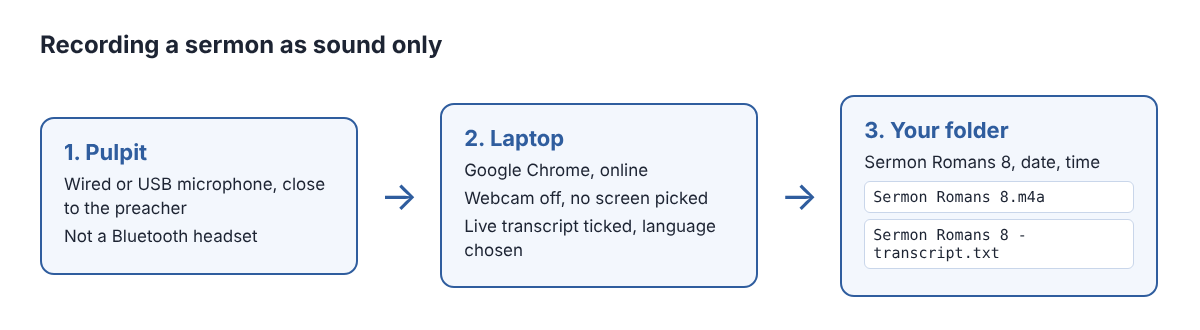
- A wired or USB microphone close to the preacher. The transcript works from what Chrome hears on the microphone, so a close microphone beats the laptop's built-in one, especially in a large room with a congregation moving and coughing.
- A power cable, because a 40-minute sermon on battery is a risk you do not need.
Skip a Bluetooth headset as the microphone. On a Mac, using one as a microphone switches it into a low-quality mode, and the voice comes out thin.
Set up the recorder for sound only
Do this before people arrive. Open Cheap Recorder in Chrome, sign in, and work down the page:
- Under Where to save, press Choose folder... and pick a folder such as
Sermons. Chrome asks whether the page may edit files there; allow it. Each recording gets its own folder inside. - In the Microphone tile, open Change or add microphones and tick the pulpit microphone. If you just plugged it in, press Rescan. Speak and watch its level bar move.
- Switch Record my webcam off and do not pick a screen. With no screen and no webcam, the recorder saves an M4A audio file instead of an MP4.
- Open Options and check that Live transcript is ticked. In the menu beside it, pick the language of the sermon. There are 25 to choose from.
- Type a name in Name this recording, such as
Sermon Romans 8.
Leave Record the microphone untouched unticked unless you have a reason to want the plain signal. When it is ticked, the recorder's echo correction is off.
During the service: a 30-second test, then one take
Before the service starts, record 30 seconds of someone speaking at the pulpit and play it back. This catches the most common Sunday problem: the wrong microphone ticked, and a recording of the laptop's own microphone at the back of the room.
Then press Start recording as the preacher walks up, and Stop and finish after the closing words. One take per sermon keeps each week in one folder with one transcript.
A long take needs two checks:
- The display. While a recording runs, the recorder asks Chrome to keep the display awake, but Chrome cannot always do this. Set the laptop's display to stay on for the length of the service.
- Your minutes. Each plan has a number of recorded minutes a month. Open your name in the top right to see how many are left. If they run out mid-sermon, the recording stops.
You will not be signed out halfway. The recorder signs you out after 15 minutes without activity, but a running recording counts as activity.
Tell the congregation the sermon is recorded, for example in the notices or the bulletin. The law on recording differs from place to place, and some places need everyone to agree, so check the rules where your church meets, especially if prayers or announcements from members could be on the file.
A worked example: one month of Sunday sermons
Say a small church records four Sunday sermons in November, each about 40 minutes, plus a 30-second test each week. That is about 162 minutes, or under 3 hours of recording. The Free plan includes 12 hours of recording a month with no card needed, so one sermon a week fits with room for a midweek study.
Each Sunday, the volunteer types a name like Sermon Romans 8. The recorder makes a folder named with that name, then the date and the time the recording began. Inside are the M4A file and Sermon Romans 8 - transcript.txt, plain text with the time of each line, which opens in any text editor. Caption files are not saved in the folder; press Captions .srt on the recording's card to download one.
Then the volunteer spends ten minutes on the transcript before it goes anywhere, as the next section shows. The times are measured from the start of the recording and are close, not exact, so "00:12:40" puts you near the reading, not on the exact word.
Fix the transcript before you share it
Speech recognition gets everyday words right and struggles with names. Sermons are full of them: books of the Bible, places, people from the reading. Read the file once and fix those.
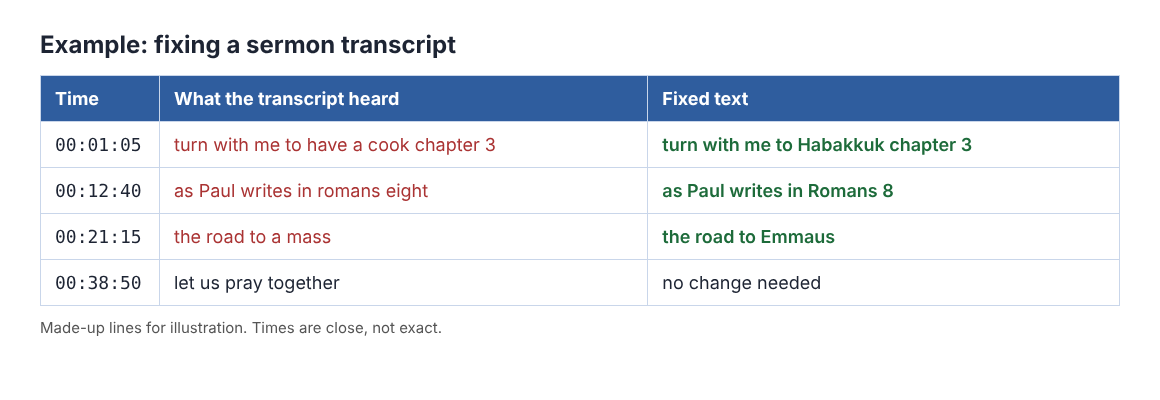
Two more fixes make it readable:
- The speaker's name. Each line is labelled with the sound source that was loudest, so a pulpit sermon is labelled with the microphone's name. On plans that include speaker detection, type the preacher's name in the Speaker box and press Save captions; the transcript is written again with that name.
- The language. Chrome listens for one language per recording, and switching language halfway gives odd results. In a bilingual service, record in the main language and expect the other parts to need typing by hand.
The transcript is only made live while you record. If Live transcript was off, there is no way to add one afterwards, so check it every Sunday before you press Start. To turn the text into a short summary for the newsletter, the post on show notes from a transcript uses the same method. For a classroom version of this route, see recording a lecture with a transcript.
Sharing the sermon and what leaves your computer
Many church websites and podcast hosts want MP3. The recording's card has Download MP3, and the convert guide lists the other formats. Converting sends the file to the server, where it is converted and deleted as soon as that finishes; the original M4A in your folder never changes.
Apart from that, Cheap Recorder keeps no copy of the recording. Two other things can leave the laptop, and you should know both. While the live transcript is on, Chrome sends the microphone audio to Google to turn it into text. And an AI button sends the transcript with speaker names to Anthropic, only when you press it. If a recording must not leave the computer in any form, untick Live transcript before you press Start recording. The privacy page lists everything, and the where recordings are saved guide shows every file in the folder.
Frequently asked questions
Can I record the sermon without a camera?
Yes. Switch off Record my webcam and do not pick a screen, and the recorder saves an M4A audio file instead of an MP4.
How many sermons fit in the Free plan?
The Free plan includes 12 hours of recording a month. A 40-minute sermon each Sunday uses under 3 of them.
Can I get a transcript of a sermon I recorded last month?
Not with Cheap Recorder. The transcript is made live while you record, so there is no way to add one to a recording made with it off.
Will the transcript name the preacher?
Lines are labelled with the microphone's name. On plans that include speaker detection, type the preacher's name in the Speaker box and press Save captions.
Get started
Plug a wired microphone into the church laptop, open Chrome and record a 30-second test before Sunday. Start free with Cheap Recorder: no card needed, and every sermon and its transcript stay in your own folder.
Screen recording that is cheap and easy.
Visit cheaprecorder.com↗